



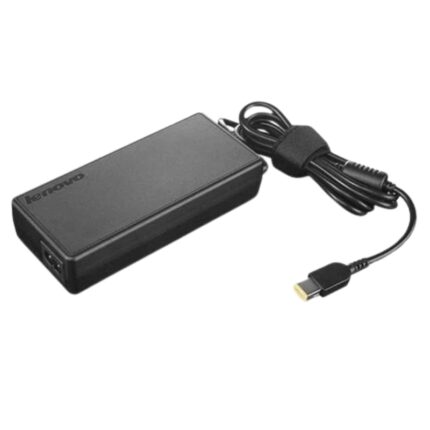

The Perfect Partner for Your Laptop on the Go
Always on the go? Stop lugging your adapter back and forth between home and office. Get a second adapter for your laptop or Tablet and keep one in the office and one for home or travel.
The 2.5mm pin laptop adapter for select Lenovo Laptops comes with 45W output power and 3.34A output current.
This 20V adapter is specially designed to meet the power needs of your Lenovo laptop.
Low ripple operating noise, High-efficiency power conversion ratio, Over Voltage, Over Current, Short circuit protection.
Backed by standard full 12-month replacement warranty, the adapter is also RoHS and CE certified.
Troubleshooting Adapter Issues
The adapter cable and power cables may get frayed or cut, and wires may become exposed at either end of the cables. This may be due to the way the cable is wrapped around the adapter, or if the cable is subject to undue stress. If the damage is severe enough to expose wires, you should discontinue using the adapter. To check the adapter, cables, and adapter port on the laptop for any damages:
- Unplug the adapter from the wall outlet.
- Unplug the adapter from the PC.
- Check the adapter and cables (including the power cable) for signs of physical damage or overheating.
- Check if the pin inside the plug or adapter port is bent, broken, or damaged.
- Unplug the adapter from the wall outlet.
- Connect another device on the wall outlet to verify if the wall outlet is working correctly.
- Try a known-good wall outlet.
- Plug the adapter directly to the wall outlet.
Bypass any power regulators like surge protectors, UPS (uninterruptible power supply), power splitters, etc.
- Unplug the adapter from the wall outlet.
- Disconnect any external peripherals that are connected to the PC.
- Remove the battery. Refer to the User Manual of the PC for instructions on how to remove the battery.
If the laptop PC has a non-removable battery, skip this step. - Press and hold the Power button for 30 seconds to drain a residual power from the PC.
- Connect the battery.
- Plug the adapter to the PC.
- Turn on the PC.
- Unplug the adapter from the wall outlet.
- Unplug the adapter from the PC.
- Disconnect the power cable from the adapter.
- Connect the power cable firmly to the adapter.
The BIOS is firmware that is embedded onto the System Board of your computer. Updating the BIOS to the latest version may help the PC recognize the adapter. Updating the BIOS to the latest version requires the laptop PC to be powered by the adapter and battery.
Technical Specifications
| Product Type | Laptop Adapter |
| Pin Size | 4.0 x 1.7 mm |
| Power Output | 20V @ 2.25A |
| Power Capacity | 45 Watt |
| Compatible Part Numbers | ADL45WCC ADLX45NCC3A ADLX45NAC3A PA-1450-55LL PA-1450-55LN GX20K11838 ADP-45DW BA ADP-45DW B PA-1450-55LL PA-1450-55LN PA-1450-55LR ADLX65CCGU2A ADLX65CDGA2A ADLX65CDGB2A ADLX65CDGC2A ADLX65CDGE2A ADLX65CDGG2A ADLX65CDGI2A ADP-65HW HA ADLX65CDGK2A ADLX65CDGU2A ADLX65CLGA2A ADLX65CLGB2A ADLX65CLGC2A ADLX65CLGE2A ADLX65CLGG2A ADLX65CLGI2A ADLX65CLGK2A ADLX65CLGR2A, ADLX65CLGU2A PA-1650-20LL ADLX65NLC3A ADLX65NDC3A ADLX65NCC3A |
| Compatible Model Numbers | Lenovo Ideapad 100/ 110 / 110S/120S/130/130S/s130 Series: 100: 100-14IBY 100-14IBD 100-15IBY 100-15IBD 100-15IBY 80MH 80QQ 80MJ 110: 110-14IBR 110-14ISK 110-14AST 110-15ISK 110-15IBR 110-15ACL Touch-15ACL 110-15AST 110-17IKB 110-17ISK 110-17ACL 80T7 80TJ 80UD 80UM 80VK 110S: 110S-11IBR 80WG 120S: 120S-11IAP 120S-14IAP 81A4 81A5 130: 130-14IKB 130-15IKB 130-15AST 81H5 81H6 81H7 130S: 130S-11IGM 130S-14IGMLenovo IdeaPad 310/310S/320/320S/330/330S Series: 310: 310-14IKB 310-14IAP 310-15ISK 310-15IKB 310-15ABR 310 Touch-15IKB 310-15IAP 80ST 80TV 80SM 320: 320-14ISK 320-14IKB 320-15IAP 320-15IKB 320-15AST 320-15ABR Touch-15ABR Touch-15IKB 320-15IKBN 320-14AST 320-14IAP 320-15IAP 320-17IKB 320-17ISK 320-17ABR 320-17AST 80XM 80XL 80XS 80XR 80XN 81BH 330: 330-14IKB 330-14AST 330-15IGM 330-15ARR 330-15IKB 330-15AST 330-15IKB Touch 330-17IKB 330-17AST 330S: 330S-14IKB 330S-14AST 330S-15IKB 330S-15ARR 330S-15AST 81F5 81F8 81F9 81FBLenovo IdeaPad 510/510S/520/520S/530/530S Series: 510: 510-14ISK 510-15ISK 510-15IKB 510S: 510S-12ISK 510S-13ISK 510S-13IKB 510S-14IKB 510S-14ISK 520: 520-15IKB 520H-15IKB 520L-15IKB 520R-15IKB 520E-15IKB 520S-14IKB 530S: 530S-14IKB 530S-14ARR 530SH-14IKB 530SL-14IKB 530SR-14IKB 530SE-14IKB 530S-15IKB 530SH-15IKB 530SL-15IKB 530SR-15IKB 530SE-15IKB Lenovo IdeaPad 710/710S Series: |
| Package Contents | Lapcare 45W Laptop Adapter for Select Lenovo Laptops |





Reviews
Clear filtersThere are no reviews yet.